When first connected to a battery, the REDARC Manager30 must learn the battery’s type, size, and full charge state. The remote will prompt for battery details, then the system enters a “Calculating” stage while it fully charges the battery to establish a reference point for accurate state-of-charge readings.
This process is fastest when connected to 240V with loads off, but can also be completed via solar or vehicle charging. If the battery isn’t full after 24 hours, the Manager will time out and assume calibration is complete.
In cases where it remains in “Calculating' for multiple days or times out, a reset may be required. REDARC recommends seeking the support of a qualified auto electrician or technician.
This information is applicable to the following Battery Management System:
- Manager30 (BMS1230S3, BMS1230S3-NA, BMS1230S3-UK)
When a REDARC Manager30 is connected to a battery (whether a new install, a battery replacement, or it's simply been disconnected), it will need to learn about the battery it’s connected to.
Firstly, the remote will prompt you to enter the battery type and size details. This gives the charger information about the battery charging voltage, efficiency, and how big the battery is.
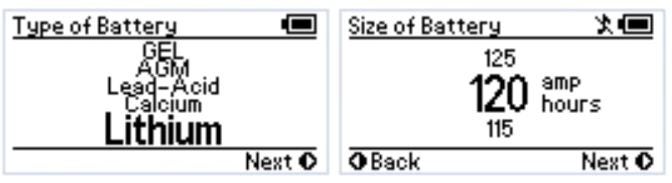
Secondly, the Manager needs to fully charge the battery. It does this so that it knows the battery has a full state of charge to use as a reference point for calculations on time till full or flat, and display its state of charge correctly. This process is displayed as 'Calculating' on the remote.
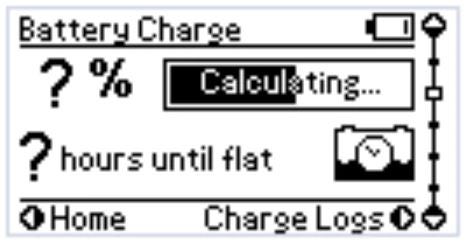
Even a brand new battery, fresh from the shelf of a battery shop, may not be fully charged. The length of time before the battery is full, (and the 'Calculating' stage completes), will depend on the type and size of the battery, and its state of charge when calculating commences. Calculating will automatically finish when the Manager is satisfied that the battery is full, and the state of charge and time frames will then be displayed.
The fastest and most effective way for the Manager to finish Calculating is to connect it to a 240V source and let it charge the battery without any loads turned on. This allows the maximum charge current to flow to the battery without being used by any loads.
If 240V isn’t available, the Calculating process will still occur from solar panels (as long as enough current is available for the Calculating period) or from a vehicle (as long as the drive time is long enough for the Calculating period).
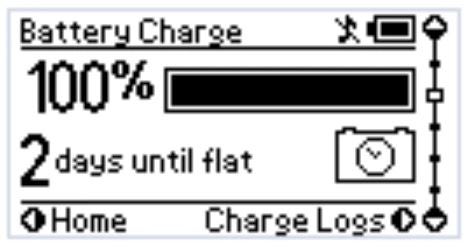
If after 24 hours of continuous charging the battery still isn’t full, the Manager will automatically time-out and deem 'Calculating' to be complete.
This can occur in cases where a battery may be very old or very hot due to an external heat source. You should always ensure that there are no external heat sources near the battery, and that correct battery care and maintenance is performed.
Important
In this article we explain the need for testing to determine the cause of the issue. Testing may involve changes to the installation or wiring. For your safety and accuracy, seek support from a REDARC recommended dealer or installer - Find Your Local Installer
If it keeps calculating for days, it is possible the Manager has got into a loop and needs a restart (much like a device that needs to be switched off/on). To perform a reset:
- Disconnect the 240V input.
- Unplug the green plug from the BMS main unit (there is a securing screw each end).
- Unbolt the battery sensor. This is the red plastic block with a brass tab, bolted to aux battery positive terminal.
- Leave for at least 1 minute.
- Reconnect in reverse order: Bolt the red battery sensor on, then plug in and secure the green plug, then connect to 240V.
- The BMS should complete calculating quickly.